# How to mark regions as "Not Reported" in BlueFuse Multi

The administrator can set global algorithm settings to mark regions smaller than the default (eg, 50 kb), as not reported by default. Thus, when an experiment is processed, the flags are set to all regions smaller than this size as "Not Reported". A user can also configure this setting on an experiment-by-experiment basis and on a region-by-region basis during the analysis. Conversely, any region previously marked as "Not Reported" can be moved back to "Reported" and toggled between the two. This functionality facilitates regions being flagged "Reported" and "Not Reported" during the analysis and annotation of the test.

**The ability to mark a region as reported**/**not reported is available for the following menu options**.

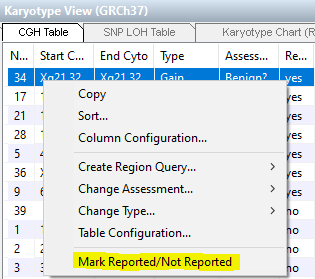
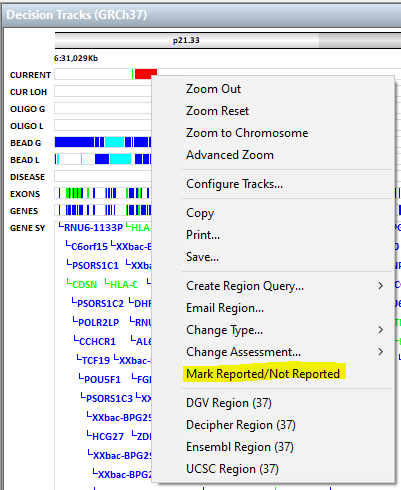
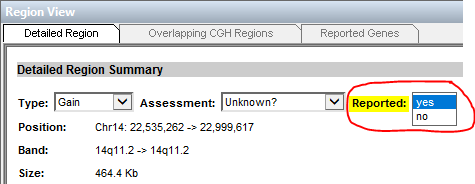
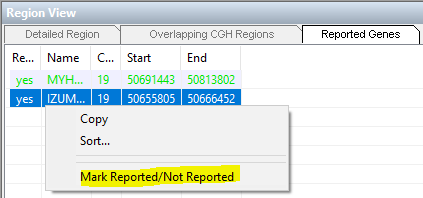
<table data-header-hidden><thead><tr><th valign="top"></th><th valign="top"></th><th valign="top"></th></tr></thead><tbody><tr><td valign="top">Menu Option</td><td valign="top">Procedure</td><td valign="top">Description</td></tr><tr><td valign="top">CGH/CNV Table</td><td valign="top">Right-click the selection, and then select Mark Reported/Not Reported. The region is then marked "no" in the reported column and "yes" in the manual change column.<br><img src="/files/90NmFQwa41xppX8mGZ6Z" alt=""><br></td><td valign="top">Allows for selecting a region to include or remove from the report. If a region is marked as "not reported," the imbalance is removed from the report and no longer displayed in the Karyotype Chart (Reported). This change is recorded in the manual change column.</td></tr><tr><td valign="top">Decision Track</td><td valign="top">Right-click the selection, and then select Mark Reported/Not Reported. The region is then marked "no" in the reported column and "yes" in the manual change column.<br><img src="/files/ErpKQb9mjL48VijfXRiP" alt=""><br></td><td valign="top">Available when a region is selected. Allows for selecting a region to include or remove from the report. If a region is marked as "not reported," the imbalance is removed from the report and no longer displayed in the Karyotype Chart (Reported). This change is recorded in the manual change column.</td></tr><tr><td valign="top">Region View (Detailed Region tab)</td><td valign="top">Remove a region using the dropdown menu. The region is then marked "no" in the reported column and "yes" in the manual change column.<br><img src="/files/qmKhjbVPS6iRFd1Pi79K" alt=""><br></td><td valign="top">Allows for setting genes as reported or not reported.</td></tr><tr><td valign="top">Region View (Reported Genes tab)</td><td valign="top">Right-click the selection, and then select Mark Reported/Not Reported. The region is then marked "no" in the reported column and "yes" in the manual change column.<br><br><img src="/files/4fyrzGa3iFn1pVTGt8MM" alt=""><br></td><td valign="top">Allows for setting genes as reported or not reported. Genes are removed from the Reported Genes tab.</td></tr></tbody></table>

After regions have been marked as Not Reported, they are excluded from the report, Karyotype Chart (Reported), CGH Chart (Reported), and CNV Chart (Reported).

For additional information, see [BlueFuse Multi Software Guide](https://support.illumina.com/downloads/bluefuse-multi-software-reference-guide-15053620.html).

\
\
\ <br>

|                                                                                                                                                                                                                                                                                                                                                                   |
| :---------------------------------------------------------------------------------------------------------------------------------------------------------------------------------------------------------------------------------------------------------------------------------------------------------------------------------------------------------------: |
| *For any feedback or questions regarding this article (Illumina Knowledge Article #5042), contact Illumina Technical Support* [*techsupport@illumina.com*](mailto:techsupport@illumina.com?subject=Question%2FFeedback%20Regarding%20Illumina%20Knowledge%20Article%20#000005042%20-%20Microarray%20\&body=Dear%20Illumina%20Technical%20Support,%0D%0A%0D%0A)*.* |


---

# Agent Instructions: Querying This Documentation

If you need additional information that is not directly available in this page, you can query the documentation dynamically by asking a question.

Perform an HTTP GET request on the current page URL with the `ask` query parameter:

```
GET https://knowledge.illumina.com/microarray/general/microarray-general-troubleshooting-list/000005042.md?ask=<question>
```

The question should be specific, self-contained, and written in natural language.
The response will contain a direct answer to the question and relevant excerpts and sources from the documentation.

Use this mechanism when the answer is not explicitly present in the current page, you need clarification or additional context, or you want to retrieve related documentation sections.