> For the complete documentation index, see [llms.txt](https://knowledge.illumina.com/llms.txt). Markdown versions of documentation pages are available by appending `.md` to page URLs; this page is available as [Markdown](https://knowledge.illumina.com/instrumentation/nextseq-500-550/instrumentation-nextseq-500-550-troubleshooting-list/000002190.md).
# How to Troubleshoot NextSeq 500/550 Control Software v4.0.1 "Invalid Role" error with Local Run Manager v2.4.0
**Background**
An issue has been identified that impacts NextSeq Control Software (NCS) v4.0.1 run set up with Local Run Manager (LRM) on NextSeq 500/550 instruments. This causes the run to stop several seconds after starting the run with an "Invalid Role" error.
**Error message:**
“Local Run Manager Error Originally Caused by: Invalid Role”
“Run stopped with error: Failed to perform LRM operation. Will try again after attempting to re-authenticate the connection.”
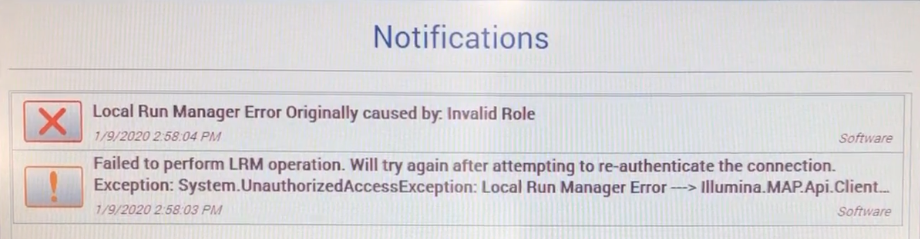
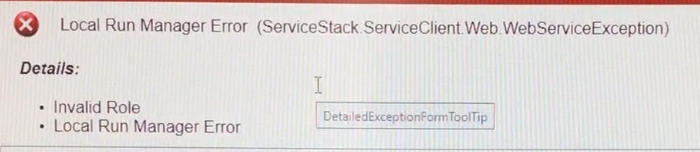
The error occurs when User Management is enabled in LRM and the user initiating the run in NCS has a "User" level role, instead of an "Admin" level role. Determine role level by navigating to **Local Run Manager Dashboard** > **Menu** > **Tools** > **User Management**.
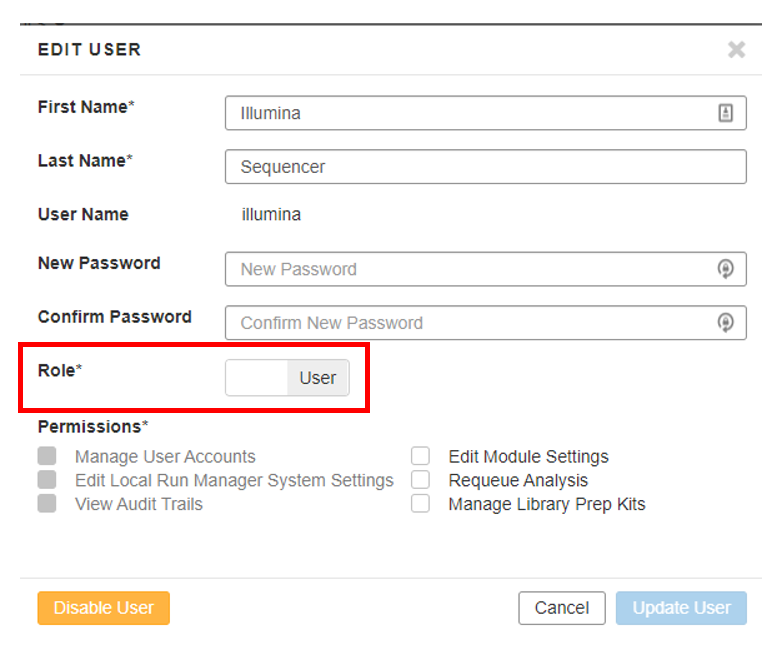
This issue affects only systems running NextSeq 500/550 Control Software v4.0.1 on NextSeq 500/550 instruments.
Illumina developers are aware of the issue and are working on a solution.
**Resolution actions**
Currently, there are two workarounds:
* If User Management is enabled, the run can be initiated in NCS by selecting **Experiment** > **Sequence** > **Set up Runs using Local Run Manager**. At the LRM login screen, log in using a LRM account that has an Admin-level role then continue with the run set up process.
* User Management can be disabled by a LRM user with Admin privileges:
* In Chromium, open LRM and login with an Admin-level role account.
* Navigate **Menu** > **Tools** > **User Management**.
* Toggle **Enable User Management** to **Off**.
* In NCS, initiate the run by selecting **Experiment** > **Sequence** > **Set up Runs using Local Run Manager**. Now, login with LRM is no longer necessary.
Since the error occurs only a few seconds after starting the run, the loaded reagents are not marked as used and can be used for the new run set up.
\
\
\
| |
| :--------------------------------------------------------------------------------------------------------------------------------------------------------------------------------------------------------------------------------------------------------------------------------------------------------------------------------------------------------------------: |
| *For any feedback or questions regarding this article (Illumina Knowledge Article #2190), contact Illumina Technical Support* [*techsupport@illumina.com*](mailto:techsupport@illumina.com?subject=Question%2FFeedback%20Regarding%20Illumina%20Knowledge%20Article%20#000002190%20-%20Instrumentation%20\&body=Dear%20Illumina%20Technical%20Support,%0D%0A%0D%0A)*.* |
---
# Agent Instructions
This documentation is published with GitBook. GitBook is the documentation platform designed so that both humans and AI agents can read, navigate, and reason over technical content effectively. Learn more at gitbook.com.
## Querying This Documentation
If you need additional information that is not directly available in this page, you can query the documentation dynamically by asking a question.
Perform an HTTP GET request on the current page URL with the `ask` query parameter, and the optional `goal` query parameter:
```
GET https://knowledge.illumina.com/instrumentation/nextseq-500-550/instrumentation-nextseq-500-550-troubleshooting-list/000002190.md?ask=&goal=
```
`ask` is the immediate question: it should be specific, self-contained, and written in natural language.
`goal` is optional and describes the broader end goal you are ultimately trying to accomplish on behalf of the user. GitBook uses it to tailor the answer towards what is most useful for that goal.
The response will contain a direct answer to the question and relevant excerpts and sources from the documentation.
Use this mechanism when the answer is not explicitly present in the current page, you need clarification or additional context, or you want to retrieve related documentation sections.