> For the complete documentation index, see [llms.txt](https://knowledge.illumina.com/llms.txt). Markdown versions of documentation pages are available by appending `.md` to page URLs; this page is available as [Markdown](https://knowledge.illumina.com/instrumentation/general/instrumentation-general-reference_material-list/000007297.md).
# NextSeq 500/550和MiniSeq测序系统上index混合的指导方针
在NextSeq500/550 和MiniSeq测序系统上对混合文库进行index测序时,非常重要的一点是要选择合适的index组合,否则可能会因为在读index时簇定位失败而导致index测序失败。本篇bulletin将针对NextSeq 和MiniSeq系统提供样本混合方针。
**双通道测序**
NextSeq 500/550和MiniSeq 测序系统只需要2张图片就可以区分4种碱基:一张图片来自红光通道,另一张图片来自绿光通道。不同于每种碱基各带一种单独的荧光标记的四通道测序,双通道测序使用两种荧光染料,C碱基标记红色,T碱基标记绿色,A碱基同时标记红色和绿色,G碱基没有荧光标记。
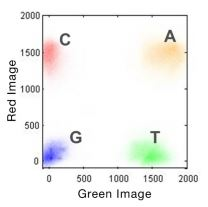
图1:双通道SBS荧光成像(假彩色图片仅是效果图)。为了提高4种DNA碱基的检测速度,MiniSeq和NextSeq500/550只用了2个图像分别捕捉红色和绿色波段的信号。仅在红色或绿色图像检测到的cluster分别被转译为C和T碱基。同时在红色图像和绿色图像被检测到的cluster被转译为A碱基,在两张图片中都没有检测到信号的cluster将被认为是G碱基。
**Index的考量**
* Index reads中前两个循环必须至少有一个碱基不是G。如果index read前面两个碱基都是G,就会由于没有荧光信号导致cluster定位失败,所以Index的前两个循环中必须有一个碱基有信号才能确保index的正常拆分。
* 选择index进行组合时,每个循环都至少有一个通道有信号,最好是两个通道都有信号。
* 红色通道对应A或者C碱基
* 绿色通道对应A或者T碱基
这样碱基读取的过程才能确保数据分析的精确。
**Index组合的例子:**\
\
\
理想的index组合:每个循环需要两个通道都有信号。\
\
可接受的index组合:只有一个通道有信号,但是仍然有足够的信号进行测序。\
\
不好的index组合:index read前两个碱基都是G,没有信号产生,导致cluster定位失败。
**✔**= 两个通道均有信号。注意,A碱基在红色和绿色两个通道中均有荧光。
**✔**= 只一个通道有信号,可接受的组合。
**✖**= 两个通道中均没有信号。
点击[这里](https://sapac.illumina.com/science/technology/next-generation-sequencing/sequencing-technology/2-channel-sbs.html?langsel=/my/) 获得更多双通道测序的信息。
\
\
\
| |
| :--------------------------------------------------------------------------------------------------------------------------------------------------------------------------------------------------------------------------------------------------------------------------------------------------------------------------------------------------------------------: |
| *For any feedback or questions regarding this article (Illumina Knowledge Article #7297), contact Illumina Technical Support* [*techsupport@illumina.com*](mailto:techsupport@illumina.com?subject=Question%2FFeedback%20Regarding%20Illumina%20Knowledge%20Article%20#000007297%20-%20Instrumentation%20\&body=Dear%20Illumina%20Technical%20Support,%0D%0A%0D%0A)*.* |
---
# Agent Instructions
This documentation is published with GitBook. GitBook is the documentation platform designed so that both humans and AI agents can read, navigate, and reason over technical content effectively. Learn more at gitbook.com.
## Querying This Documentation
If you need additional information that is not directly available in this page, you can query the documentation dynamically by asking a question.
Perform an HTTP GET request on the current page URL with the `ask` query parameter, and the optional `goal` query parameter:
```
GET https://knowledge.illumina.com/instrumentation/general/instrumentation-general-reference_material-list/000007297.md?ask=&goal=
```
`ask` is the immediate question: it should be specific, self-contained, and written in natural language.
`goal` is optional and describes the broader end goal you are ultimately trying to accomplish on behalf of the user. GitBook uses it to tailor the answer towards what is most useful for that goal.
The response will contain a direct answer to the question and relevant excerpts and sources from the documentation.
Use this mechanism when the answer is not explicitly present in the current page, you need clarification or additional context, or you want to retrieve related documentation sections.